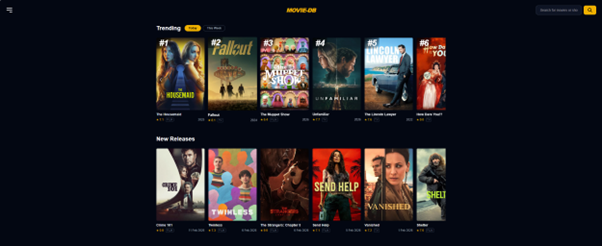
Building Movie-DB - Personalizing Media Discovery
I built Movie-DB because I wanted to solve a personal frustration. While databases like TMDB are incredible resources, they can feel clunky and overwhelming for casual browsing. My goal was to build a streamlined "discovery engine" - a sandbox where I could explore new media and "request" titles for a library without the standard database friction.
My Tech Stack
- Framework: Next.js 15 (App Router)
- Database: Prisma + Supabase (PostgreSQL)
- Auth: NextAuth.js
- Styling: Tailwind CSS
- API: TMDB (The Movie Database)
- Communications: Resend (Email Notifications)
1. The Vision: Discovery Over Documentation
Most media databases are built for documentation, not discovery. For Movie-DB, I focused on a "hypothetical request" system.
- The Workflow: I wanted a space where I could find a film and "request" it with one click. I used Next.js Server Actions to handle the request lifecycle, ensuring that even if a film was previously rejected, a new request would correctly update the status in my database.
- Instant Feedback: To make the system feel "live," I integrated Resend to fire off an instant email notification to my admin account whenever a new title was requested.
- Cinematic UI: Using Tailwind CSS, I implemented a custom "Read More" toggle in the Media Hero that uses a CSS
maskImagegradient to create a smooth fade-out effect. This keeps the title and rating "locked" in place while text expands downward.
2. Centralized Control: The Admin Dashboard
A major part of the development was building a custom Admin Dashboard. This wasn't just about managing movie requests; it was about managing the people using the app.
- User Management: I built a dedicated interface to create, view, and edit user profiles. This allows me to control access levels and manage permissions directly within the app.
- Request Moderation: The dashboard serves as the command center for approving or rejecting movie requests. When I mark a film as "ADDED," the status updates globally, changing the UI for every user to show a green "Added to Library" badge.
3. Application Flow
To understand how Movie-DB functions, here is the high-level flow of a single request:
- Discovery: I browse the TMDB-powered frontend to find a movie.
- Action: I trigger a Server Action by clicking the "Request" button.
- Storage: Prisma writes a new
Requestrecord to the Supabase database with aPENDINGstatus. - Notification: Resend fires an automated email to my admin address with the movie details and a direct login link.
- Resolution: I log into the Dashboard, review the request, and update the status to
ADDED. - Sync: The frontend revalidates via
revalidatePath, and the movie now appears as part of the library for all users instantly.
4. The Bandwidth Spike & Edge Protection
During development, the project hit a 100GB bandwidth limit on Vercel due to aggressive AI scraping. I had to act fast to protect my resources.
- Hard Blocking: Instead of a
robots.txt(which bots can ignore), I used the Vercel Firewall to implement a hard block on all known AI bots at the Edge level. This stopped the requests before they ever touched my server logic. - Image Optimization: I swapped Next.js's
<Image />component for standard HTML<img>tags. This forced the browser to pull images directly from TMDB's CDN, bypassing Vercel's processing and saving significant bandwidth.
5. The Roadmap: Logs, Reviews, and Watchlists
Movie-DB is expanding from a simple request tool into a full personal media journal. I’m currently working on:
- Personal Logs: A "Diary" feature to log exactly when I watched a film.
- User Reviews: A system for personal ratings and thoughts, independent of the TMDB score.
- Watchlists: A space for users to curate "Want to Watch" lists without triggering a global request, giving them a private space to explore media.
Final Thoughts
Building Movie-DB taught me that UX is a balance of aesthetics and economics. By leveraging Tailwind’s JIT engine and Vercel's Edge security, I kept the application fast, secure, and visually striking. It’s a tool that doesn't just catalog media—it makes finding your next favorite film an absolute pleasure.
You can view the website here: movie-db